


Process payments
List of bank payments
Consult payments received by QR-bill, check receipts and export them for accounting
The page List of payments shows all bank payments (QR-bill, payment slip) imported into Plugin.ch over a period: who paid, which invoice, what amount, and whether the invoice is settled. It is used to check receipts, reconcile with your bank statements and for the treasurer's reports.
Open the list and choose the period
In the left side menu, open Invoices then List of payments. By default, the page shows the last 30 days. The shortcuts 30 days, This month, Last month, This year and Last year change the period in one click; you can also enter two dates in Payment period then click Show.
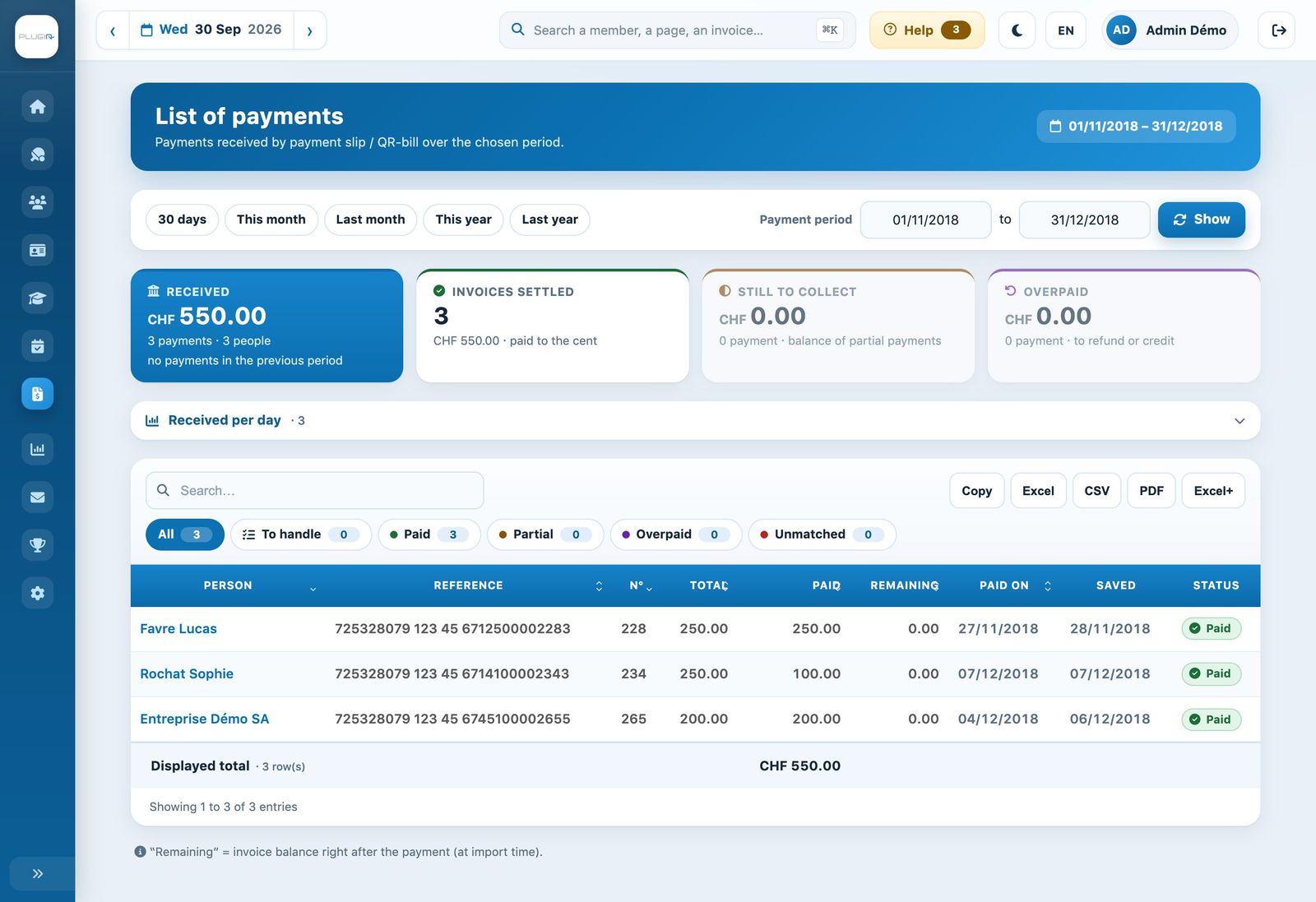
The list of payments for a period
Read the totals banner
- Received: the total received over the period, the number of payments and people, and the change compared with the previous period.
- Invoices settled: invoices paid to the exact cent.
- Still to collect: the balance of invoices that were only partly paid.
- Overpaid: amounts overpaid, to be refunded or credited.
- No invoice: payments whose reference matches no invoice, to be assigned manually.
Click a card (except Received) to show the payments concerned. The Received per day (per month for a long period) details the amounts received; click a line to filter the list on that day.
Filter the payments
The chips filter payments by status: All, To handle (everything that requires action), Paid, Partial, Overpaid and Unmatched (no invoice matches the reference). The search field filters by name, reference, invoice number or invoice group name. The Displayed total follows the filters.
For each payment, the list shows:
- Person: the person who paid;
- Reference: the payment reference of the QR-bill;
- N°: the number of the paid invoice, with the name of its group;
- Total: the invoice amount;
- Paid: the amount received;
- Remainder: the invoice balance after this payment;
- Paid on: the payment date;
- Saved: the import date;
- Status: the result of matching with the invoice.
Good to know: the “Remainder” column gives the invoice balance just after this payment, at the time of import. If the situation has changed since then (another payment, invoice modified), a small badge below the amount shows the current balance.
Export the list
The buttons Copy, Excel, CSV, PDF and Excel+ export the displayed list. Use them for your monthly or annual reports and for reconciliation with the bank statement.
Tip: regularly compare the total Received with your bank statement. A payment Unmatched or Overpaid must be handled: assign it to the right invoice, refund it or carry it forward (see Process a manual payment and Process installments).
Plugin.ch Tutorial — Process payments