


Managing payroll
Salary certificates and annual lists
Annual summary, salary certificate (Form 11) and lists for the AVS office, the accident insurer and the pension fund
At the end of the year (or when an employee leaves), Plugin.ch prepares everything you need to hand in: each employee's salary certificate and the salary lists required by the AVS office, the accident insurer and the pension fund. Everything is in Invoices → Payroll, tab Year & certificates. Choose the year with the ‹ › arrows in the banner.
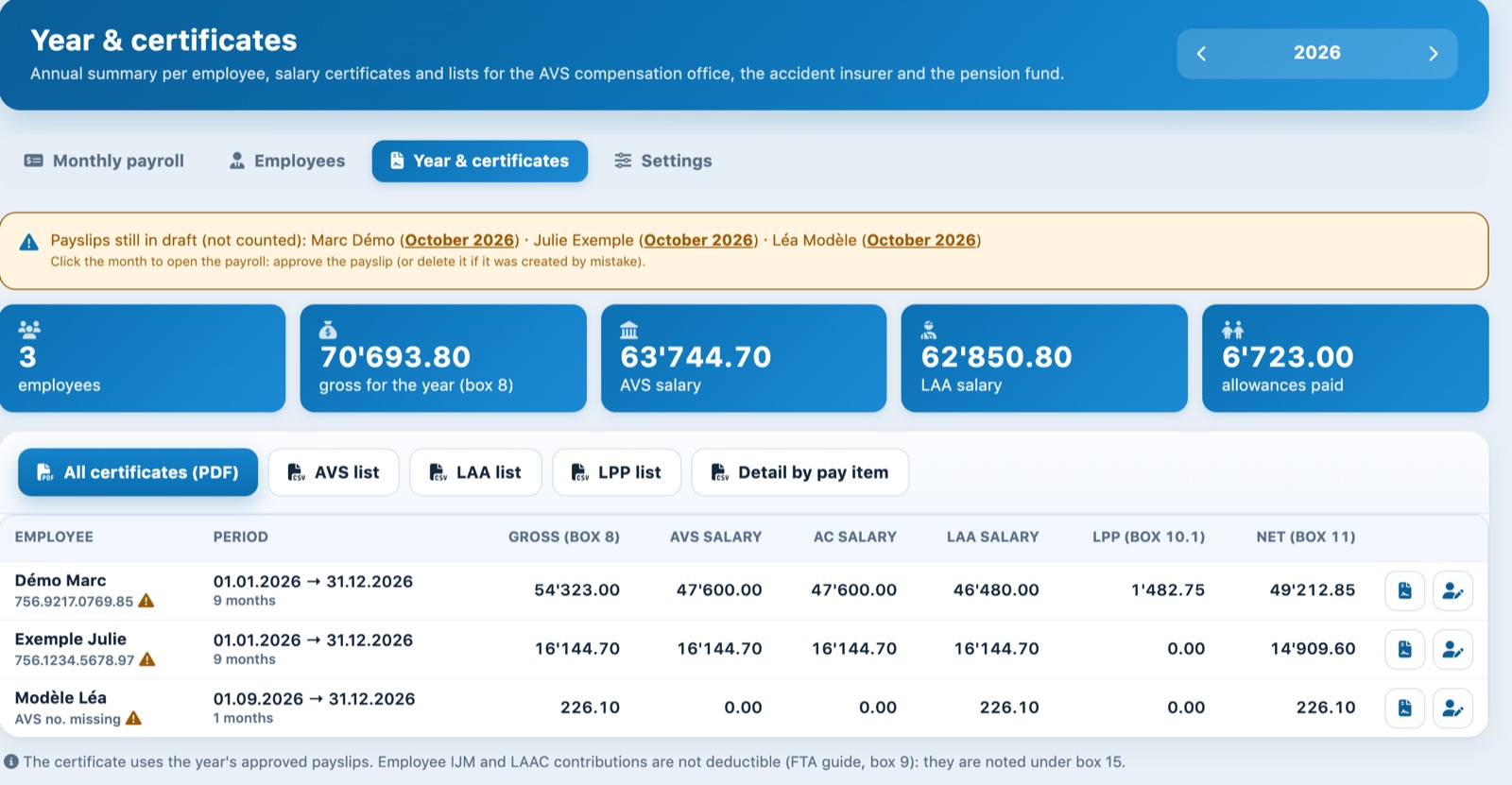
The Year & certificates tab during the year: the October payslips are still drafts.
Check that all payslips are approved
The summary, certificates and lists only include approved payslips. A draft payslip is counted nowhere.
If there are still drafts in the year, an orange banner lists them per employee, with the month as a link: click the month to open the payroll, then approve the payslip, or delete it if it was created by mistake. In the table, a triangle next to the name also flags an employee with months not approved.
Also check the AVS number: if it is missing, the table shows AVS no. missing under the name. Complete the employee record before printing their certificate.
Read the annual summary
At the top, the year totals: number of employees, gross for the year (box 8 of the certificate), AVS salary, LAA salary and family allowances paid.
The table shows for each employee:
| Column | Content |
|---|---|
| Period | From 1 January (or the start date) to 31 December (or the leaving date), and the number of approved months. |
| Gross (box 8) | The certificate's total gross salary. |
| AVS salary, AC salary, LAA salary | The salaries subject to each insurance, after allowances and ceilings. |
| LPP (box 10.1) | The employee's ordinary LPP contributions. |
| Net (box 11) | The certificate's net salary, which the employee enters in their tax return. |
At the end of each row, one icon opens the employee's certificate, the other their record.
Print the salary certificates
Click All certificates (PDF) to get one certificate per page, for all employees with at least one approved payslip in the year. For a single employee, use the certificate icon on their row.
The certificate follows the official Form 11 layout, with labels in German, French and Italian, whatever the language of the administration. Only the remarks in box 15 are written in the administration's language.
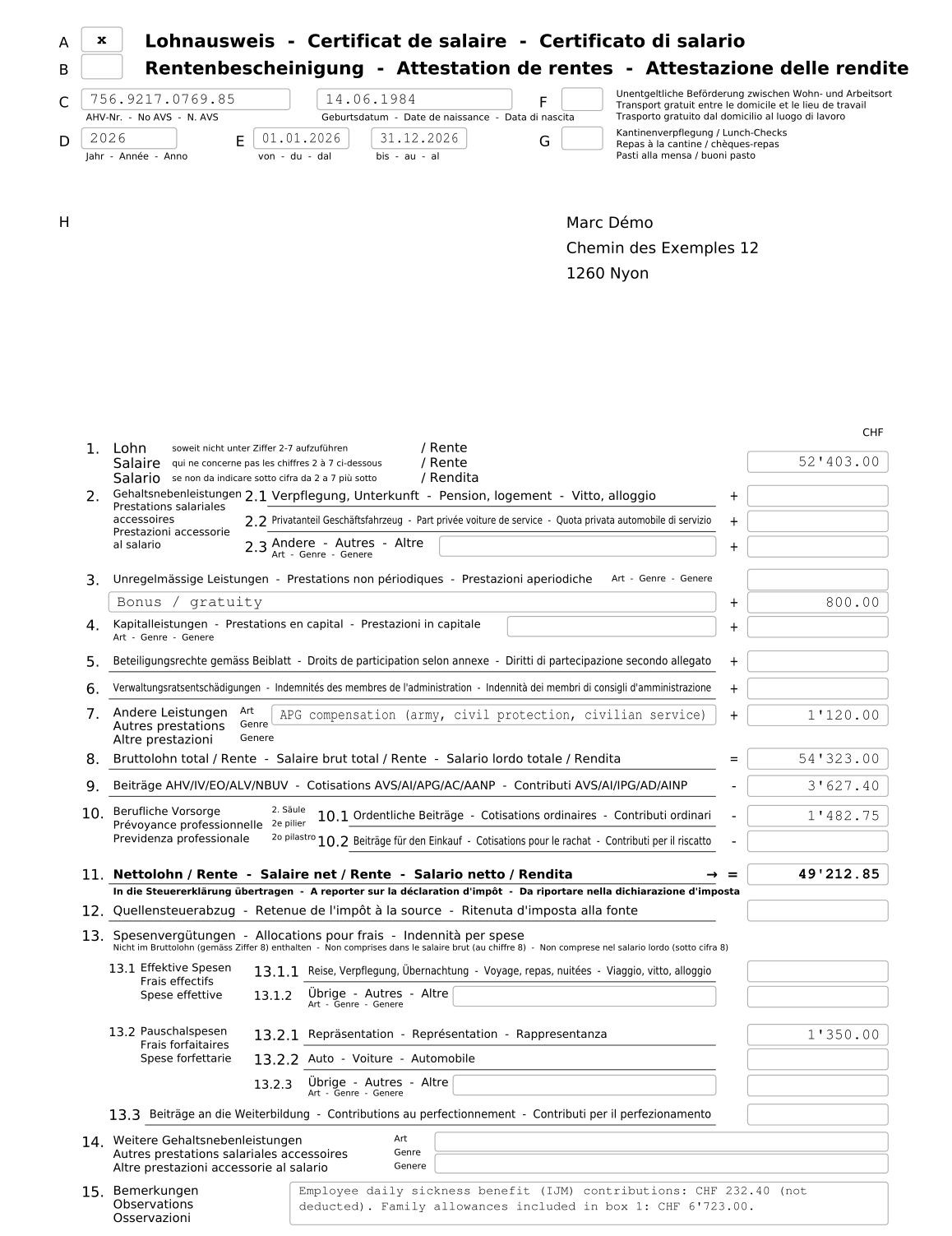
The salary certificate (Form 11), from the top down to the remarks in box 15.
Where the information comes from
- C: AVS number and date of birth from the employee record.
- D and E: the year and the period of employment in the year.
- F and G: the boxes ticked on the employee record, section Salary certificate (free transport, canteen meals).
- H: the employee's name and address.
- I: the place and date of printing, and the employer block (club name, signatory, address and phone). The place and signatory are set in Settings, section AVS office and employer.
What goes in each box
Each payslip line comes from a pay item, and each pay item states its certificate box (the small number shown next to the line in the payslip). By default:
| Box | Pay items |
|---|---|
| 1 Salary | Monthly salary or hours, holidays, public holidays, 13th salary, allowances, daily sickness and accident benefits, family allowances |
| 2.1 to 2.3 | Benefits in kind (board and lodging, private use of company car, other) |
| 3 | Bonuses and gratuities |
| 7 | APG compensation (army, maternity, paternity) and other benefits |
| 8 | Total of boxes 1 to 7 |
| 9 | AVS/AI/APG, unemployment insurance and non-occupational accident contributions |
| 10.1 and 10.2 | Ordinary LPP contributions and LPP buy-ins |
| 11 | Net salary: box 8 minus boxes 9 and 10 |
| 13 | Flat-rate expenses (entertainment, car, other), other actual expenses and further training |
| 15 | Remarks (see below) |
You can change a pay item's box in Settings, section Pay items, field Salary certificate box.
The remarks in box 15
Plugin.ch automatically writes there:
- the employee's contributions to sickness benefits insurance (IJM) and supplementary accident insurance: they are not deductible and therefore do not appear in box 9;
- the employee's family allowance contributions and other employee contributions;
- the amount of family allowances included in box 1;
- for actual expenses reimbursed against receipts, a note that they are not declared;
- the Approved expense regulations and the Remarks (box 15) entered on the employee record.
No withholding tax and no barcode. Plugin.ch does not handle withholding tax (box 12 stays empty) or electronic Swissdec transmission. The certificate therefore has no 2D barcode: it remains valid on paper or as a PDF.
Download the annual lists
The following buttons download a CSV file (columns separated by semicolons, readable in Excel) for the year shown:
| Button | For whom | Content per employee |
|---|---|---|
| AVS list | The AVS office | AVS no., name, date of birth, period, AVS salary, AC salary, employee AVS and AC contributions, family allowances |
| LAA list | The accident insurer | AVS no., name, period, LAA salary, ANP and AP premiums, supplementary accident insurance and sickness benefits (employee and employer shares) |
| LPP list | The pension fund | AVS no., name, date of birth, period, AVS salary, employee and employer LPP contributions, buy-ins |
| Detail by pay item | Your own checks or your accountant | The year total of each pay item used, with gross (box 8) and net (box 11) |
Use these lists to fill in each fund's or insurer's annual salary declaration, on its portal or form.
Plugin.ch tutorial — Managing payroll